

- Introduction
- Manual testing
- Autoit
- Ant
- Agilitest
- Bat
- Bat With Params
- Beanshell
- Cerberus
- Cucumber
- Cucumber v2 (BDD & Gherkin support)
- eTASQ Motion (Ponant)
- Executable
- FitNesse
- Gatling
- Generic Version-Control
- Git, Gitlab, Github
- Gradle
- Java
- Jar
- JMeter
- JMeter SQL
- JMeter Web
- JUnit
- Katalon
- Katalon v2
- Marathon
- Maven
- Mocha
- NeoLoad
- NUnit
- Odin Axe
- Odin Axe Results
- Offline
- Perl
- PHPUnit
- Postman (Newman)
- Protractor
- Python
- PyUnit
- PyTest
- QF-Test
- Quick Test Pro/UFT
- Ranorex
- Rapise
- RobotFramework
- RobotFramework v2
- RobotFramework v3
- RobotFramework v4
- Sahi
- Sahi 3.5
- Sahi 4.0
- Sahi 6.0
- Selenese
- Selenium HTML
- Selenium 3
- Selenium Java
- Selenium .NET
- Selenium Python
- Shell
- Sikuli
- SikuliX
- SilkTest
- SoapUI
- SoapUI Load
- SoapUI Security
- SOATest
- SQL Compare
- SQL Select
- Squish
- SVN (Subversion)
- Tape
- Tcl
- TestComplete
- TestComplete v2
- TestExecute
- TestExecute v2
- TestNG
- TestOptimal
- TestOptimal Simple
- TestPartner
- TestStand
- VisualStudio
- VisualStudio Coded UI
- WAPT
- WebdriverIO
- WebUI
- XCI
- xUnit.net
- Success (skeleton)
- Random (skeleton)
- Proxy
Hewlett Packard� QuickTest Pro/UFT (Unified Functional Testing) Launcher (qtp.jar)
The Hewlett Packard� QuickTest Pro launcher allows running test generated using QuickTest Pro and UFT.Configuration
Theqtp.xml file is just a template and must NOT be edited. It's used by the system to build dynamically the form that the user will be able to fill in from the GUI when creating a custom execution configuration.| Parameter | Description |
| General | |
| Test root path | This must indicate where are located all the QTP scripts. This is a root path. Each test in XStudio has a canonical path that will be appended to this path. This path MUST not include an ending slash. Default value is: C:/test_repository/tests/qtp
|
| Windows cscript.exe path | This must indicate the path to the VB interpreter included withing Windows used to run the test. Default value is: C:/WINDOWS/system32/cscript.exe
|
| QTP | |
| Results folders name prefix | This must indicate the prefix of the folder generated by XStudio that contains the output and report on the test execution. Default value is: Res
|
| QTP Visible | This must indicate if you want to see QTP GUI while the tests are executed by XStudio Default value is: True
|
| QTP window state | This can take 2 different values Maximized or Minimized and corresponds to the default state of the QTP Window during execution.Default value is: Maximized
|
| QTP View | This can take 2 different values ExpertView or KeywordView and corresponds to the mode selected in the QTP Window during execution.Default value is: ExpertView
|
| Quit QTP after test | This must indicate if you wish to quit QTP after the execution. Default value is: True
|
| Default result when no verification in script | This can take 4 different values: Success, Failure, Indefinite or Not Executed.This is the default result given to a test if no verification are performed in the script (only a list of action with no assertion). Default value is: Indefinite (Relative in versions <=3.1)
|
These values can be changed while creating the campaign session from XStudio.
Note about file path parameters:
Any parameter referring to a file or folder path (for instance Test root path) can be provided either using
On windows, if you provide a path containing an OS-localizable folder such as
Any parameter referring to a file or folder path (for instance Test root path) can be provided either using
\ separator (if the tests are going to be executed on a Windows agent) or / separator (if the tests are going to be executed on a linux or MacOSX agent).On windows, if you provide a path containing an OS-localizable folder such as
C:\Program Files, always prefer the English version (i.e. NOT C:\Programmes if you're using a french-localized Windows) or the corresponding native environment variable (i.e. %PROGRAMFILES%).
Process
The launcher will generate and execute a VB script that will open QTP and run the required test.QTP must be configured (this is the settings by default) to generate for each test a report in a new run results folders:
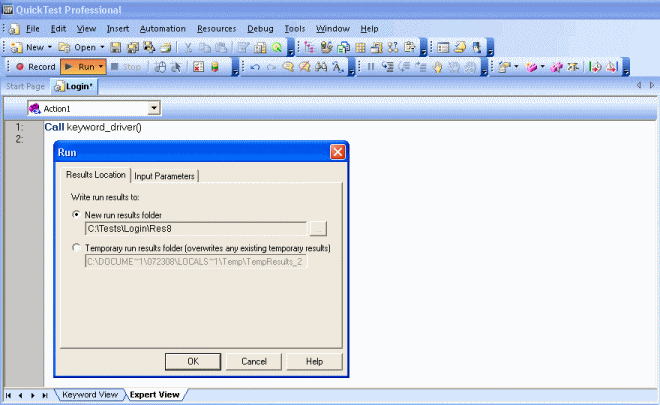
Tutorial: Creating and executing QTP tests
In this tutorial, we will learn to run some QTP tests.Prerequisites
Install QTP wherever you want and create a QTP test inC:\\test_repository\\tests\\qtp\\folder1\\Test1.qtp.
Create a dedicated category for QTP tests and create a test
- create a category QTP associated to the launcher qtp.jar
- under this category, create (somewhere in the tree) a test with name Test1 and with a canonical path set to folder1.
- it's not needed to create some test cases under this test.
Creating a test campaign
- create a campaign including only the test Test1
- create a campaign session using a configuration having all the default values.
Run a campaign session
Run the campaign sessionAfter the session's execution is completed, you can look at the results from XStudio:
- the messages indicate the failure rate and the average time to execute the queries
- you can also check that all the qtp traces and the qtp xml report are uploaded in XStudio
- if the test is parametrized using a data file (Excel), the Excel file is uploaded as well in XStudio
Permissions
WARNING: if you're running your tests on Windows, it may be required to run the tests as administrator.
Having an account with Administrators permissions may even not be enough in some cases (especially if you're using Windows 10) and you may need to disable completely the UAC (User Access Control) on your computer.
To do so:
Having an account with Administrators permissions may even not be enough in some cases (especially if you're using Windows 10) and you may need to disable completely the UAC (User Access Control) on your computer.
To do so:
- Press the
Windows + Rkey combination - Type in
regedit - Go to HKEY_LOCAL_MACHINE\SOFTWARE\Microsoft\Windows\CurrentVersion\Policies\System
- In the right-side pane, look for EnableLUA and set the value
0 - Close the registry editor
- Restart your computer
Debug
If your tests are not executed correctly or are reporting only failures, this is very likely because your configuration is incorrect or because you used a wrong naming convention for your tests and test cases.
The best way to quickly find out what's wrong is to look at the traces generated by XStudio (or XAgent).
The traces always include the detailed description of what the launcher performs (command line execution, script execution, API calling etc.) to run a test case. So, if you experiment some problems, the first thing to do is to activate the traces and look at what's happening when you run your tests.
Then, try to execute manually in a
This will normally fail the same way.
At this point, you needs to figure out what has to be changed in these commands in order to have them run properly.
When you have something working, compare these commands to what's described in the Process chapter above. This will tell you exactly what you need to change.
Most of the time, this is related to:
The best way to quickly find out what's wrong is to look at the traces generated by XStudio (or XAgent).
The traces always include the detailed description of what the launcher performs (command line execution, script execution, API calling etc.) to run a test case. So, if you experiment some problems, the first thing to do is to activate the traces and look at what's happening when you run your tests.
Then, try to execute manually in a
cmd box the exact same commands.This will normally fail the same way.
At this point, you needs to figure out what has to be changed in these commands in order to have them run properly.
When you have something working, compare these commands to what's described in the Process chapter above. This will tell you exactly what you need to change.
Most of the time, this is related to:
- some incorrect values in some parameters of your configuration,
- the name of your tests,
- the name of your test cases,
- the canonical path of your tests