

- Evaluation
- Getting support
- FAQ
- How do I get the log/traces of XQual?
- I cannot make XQual JNLP client work. What Am I doing wrong?
- XQual is not yet localized for my language
- I can't upload files bigger than 1MByte. Why that?
- Where are my attachments downloaded?
- Why after I updated then rollbacked, I do not see the original version of my xstudio?
- Is there any way to speed up the startup time of XQual JNLP client?
- I lost my admin password and do not have any other account with admin right. How can I recover my password?
- How do I enable Java in my browser (for XQual JNLP client)?
- Why can't I connect to my Microsoft SQL Server?
- What do I need to configure TLS/SSL on the Database connection?
- Recently I started to get some error popups when creating item. Logs show issues related to utf8mb4. What's wrong?
- I'm getting a java.lang.noClassDefFoundError when starting Tomcat
- What does 'java.awt.AWTError: Assistive Technology not found: org.GNOME.Accessibility.AtkWrapper' means?
- The server reports an error when we try to generate a PDF report from XQual.web
How can I try XQual?
Yes, you can ask for a trial dedicated server for free and for 30 days.Want to try XStudio for FREE?
| In our cloud | Try for free |
| On premise | Contact us |
Note:
- If you wish to test with MSSQL, you'll need to get a trial license
- If you wish to test with Oracle, you'll need to get a trial license
- If you wish to test with LDAP, you'll need to get a trial license
Which edition is the best for me to evaluate?
You can get a description of the various features that are present in each edition here.How do I get assistance to accelerate my evaluation?
You have direct and free access to different training resources on our dedicated web-site:- An E-learning videos portal (videos in English and French)
- A BootStrap package that provides a guide and the import files to load some data avoiding you to type in too many information
- Some white papers to learn and become expert with XQual
- Some presentations focusing on specifics
You also have access to:
- Our 24x7 Service Helpdesk
- Direct access to our support at support@xqual.com
After I have evaluated XQual, can I keep the data I already entered?
YES, all of the data will be in your production instance and you won't have to re-enter them.Can I change from one edition to another if I decide to?
You can always upgrade or downgrade during or after your evaluation.Downgrading will reduce the feature set, but you will keep all of your data.
How do I get technical support?
The fastest support is provided through:- Our 24x7 Service Helpdesk
- Direct access to our support at support@xqual.com
Can I get direct support using only emails?
YES, our ticketing system allows for direct emails. Just send and reply to emails will keep the history.Your initial email must be sent to our support at support@xqual.com.
How do I know about the latest changes and if the bug I reported has been fixed?
For urgent bugs and evolutions specifically requested and planned, we just alert you directly.We also keep a transparent and as accurate as possible Changelog.
Also, you may want to follow us on our social networks (see contacts).
I found a bug. Where can I submit it?
Bugs can be reported through our dedicated Ticketing System.You can also directly contact support@xqual.com to get a quick answer and/or a bug fix.
In ANY case, please first activate the traces and provide these traces in your report, indicate the exact version you're running, which client and the OS you're running.
It's also a good idea to check first the integrity of your database by clicking on the menu item
Tools > Check database integrityHow do I get the log/traces of XQual?
With the XQual server
There are traces server side (the more interesting part) and client side.Server side:
The traces are usually located in a file named
catalina.out or catalina.<date>.log on the server.The specific location of this file depends from the OS, the version of Tomcat, how you installed it and how it is configured to log the traces.
The 2 most frequent locations are:
/var/lib/tomcatX/logs//var/logs/tomcatX/Other ways to find it:
- search for the file
logging.properties in the Tomcat installation directory and check the value of the property 1catalina.org.apache.juli.FileHandler.directory.- check the
server.xml file of your Tomcat installation.- check the
catalina.sh script of your Tomcat installation.- search for the files containing the text 'GET COMMAND =' (e.g. on linux:
find /var/lib/tomcat8 -type f -exec grep -l "GET COMMAND =" {} \;)
Client side:
Just enable your browser's debugger by pressing the
F12 key.Traces are available in the console tab of the debugger.
With the JNLP clients
You need to activate the java console to see the log. The screen buffer size is pretty small and it's advised activating the tracing so that a trace file is automatically created for you.To activate the java console:
Windows start menu > Control Panel > Programs > Java > Advanced > Debugging > Enable tracingWindows start menu > Control Panel > Programs > Java > Advanced > Java Console > Show console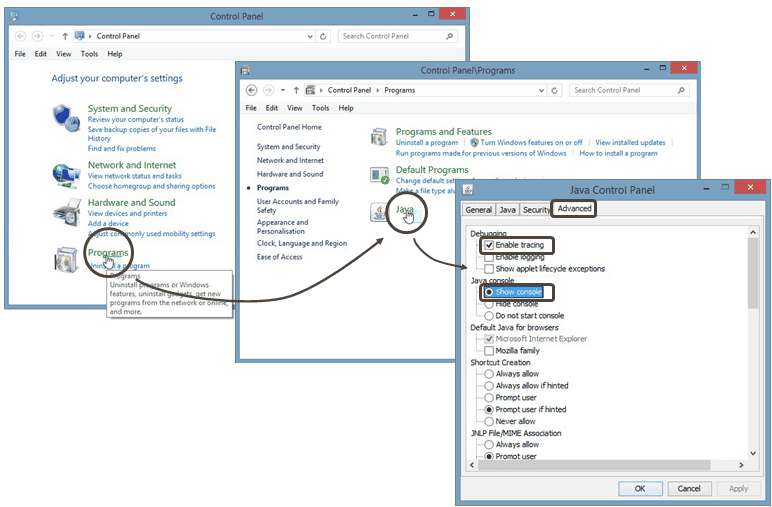
Note: If in addition you enable the logging feature (available from the same settings panel), the log file will be generated in:
| Windows XP: | %HOME%\\Application Data\\Sun\\Java\\Deployment\\log |
|
| Windows 10/Windows 8/Windows 7/Vista: | %APPDATA%\\..\\LocalLow\\Sun\\Java\\Deployment\\log |
|
| Linux/Solaris: | %HOME%/.java/deployment/log |
javaws1287369374028910351.trace.
Just look at the last updated time to see what is the latest oneI cannot make XQual JNLP client work. What Am I doing wrong?
There are many reasons why a JNLP client connection could fail.Here are the list of things to check:
- First thing is to check that your firewall authorizes you to connect to outbound port 3306. To verify this, you can run
PortQryV2. (it's a free port scanner made available for free by Microsoft) with the following command line
PortQry.exe -n <server name or IP address> -e 3306.
If your company firewall is correctly configured you should get an output similar to:
				c:\PortQryV2>PortQry.exe -n <your_server_name_ip_address> -e 3306
				Querying target system called:
				<your_server_name_ip_address>
				Attempting to resolve IP address to a name...
				IP address resolved to <your_server_name>
				querying...
				TCP port 3306 (unknown service): LISTENING
Alternatively, you can also use the commandtelnet <server name or IP address> 3306. If you get garbage characters it means the firewall is ok.
- This can be due to one or several invalid packages (i.e. because of a micro network failure during the download).
In this case there is a very efficient solution: clear the Java cache to force the system to download all the resources again:
Windows start menu > Control Panel > Programs > Java > General > Temporary Internet Files > View...
Select "Resources"in the "Show" drop-down menu, select everything and delete
Restart XQual normally.
An alternative way (faster) consists in deleting the cache the hard way.
- On Windows: Delete all the content of the folder%UserProfile%\AppData\LocalLow\Sun\Java\Deployment\cache
- On MacOSX: Delete all the content of the folder~/Library/Caches/Java/cache
- On Linux: Delete all the content of the folder~/.java/deployment/cache
- Check in the
xstudio.conffile that you're using a real resolvable name or a valid IP address for thedatabase_serverparameter. Do NOT uselocalhostor127.0.0.1. - Check that the
database_serverparameter inxstudio.confand thecodebaseattribute inxstudio.jnlpare identical. - Check you do not have extra leading or ending space in the parameter's values in
xstudio.conf - If the fat client works fine (you can start XQual, login and use it), you can:
- Copy
xstudio.confto your web server install (overwrite the default one in thexstudiodirectory) - Copy the JDBC driver you're using in fat client to the web server as well (in
xstudio/jdbcdirectory)
- Copy
- In some cases, this may be due to DNS issues. Of course the proper solution is to fix the problem on your company DNS server
but a workaround is to insert the server name into your local
/etc/hosts(on linux) or%systemroot%\system32\drivers\etc\hosts(on Windows) file.
- It can also be due to networking issue. One thing people sometimes need to do is to change the network settings of their Java client:
Windows start menu > Control Panel > Programs > Java > General > Network Settings > Network Settings....
It may be needed to selectDirect Connectioninstead ofUse Browser Settingsor vice-versa. In some other cases, it may be necessary to set the company proxy settings manually.
- If your network use a proxy to connect to the internet, you need to set this up as well for Java:
Windows start menu > Control Panel > Programs > Java > General > Network settings > Network Settings...
- If your client computer does not have much RAM you can reduce the maximum heap size in the JNLP configuration on the server.
Editxstudio.jnlpand lower themax-heap-sizevalue. i.e.max-heap-size="512m".
- In some computers, JNLP may prefer to use the IPv4 stack to communicate with the server. You can try to edit
xstudio.jnlpand set the<argument>--forceIpv4</argument> <argument>true</argument>.
- You may also try to uninstall your jre and reinstall it from
http://www.java.com.
Ensure to install a JRE version 7-10 though.
xstudio.conf are also valid for bugtracking.conf.
XQual is not yet localized for my language
It is very easy to localize XQual. There is a quite simple procedure to add a custom localization described here.I can't upload files bigger than 1MByte. Why that?
MySql default configuration prevents from uploading files bigger than 1MByte.In this case you may encounter errors such as:
java.sql.SQLNonTransientConnectionException: Could not send query: Connection reset by peer: socket write error or similar.To change this, edit the file
my.ini and add the configuration parameter max_allowed_packet=100M in the [mysqld] section.There is also a parameter in XQual's settings to softly limit the size of the attachments. Ensure you do not have any limit in there too.
Where are my attachments downloaded?
When you click on the download or download and lock button, the files are downloaded in your system temporary directory. On windows, it is often located inC:\\Documents and Settings\\<your account>\\Local Settings\Temp\\ (this is specified in the %TEMP% or %TMP% variable).Why after I updated then rollbacked, I do not see the original version of my xstudio?
The Java cache is the cause and you need to clear the cache:Windows start menu > Control Panel > Programs > Java > General > Temporary Internet Files > View...Select "Resources"in the "Show" drop-down menu, select everything and delete
Restart XQual normally...
Is there any way to speed up the startup time of XQual JNLP client?
Yes there is. If you have a large number of tests/test cases and you use the test procedures, you can disable the Testplan Autocompletion feature (from the settings). This will speedup considerably the startup time. You can also look in your server settings if you see some greedy features enabled (they are marked as "impacting performances"). Our advice: go with the web client! it's much faster.I lost my admin password and do not have any other account with admin right. How can I recover my password?
You can't do it from XQual (hopefully or it would be a major security hole!).You need to ask your database administrator to manually update the column
user_password of the admin user in the table table_user with the value:984F1197F84B21DDA2A631F72F9D082501B4FA1AA3798DC420A26ADE0B8792504325EBD701.This procedure restores the default admin password:
password.How do I enable Java in my browser (for XQual JNLP client)?
If you recently installed Java, you may need to restart your browser (close all browser windows and re-open) in order for the browser to complete the installation. In addition, make sure Java content in the browser is enabled through the Java Control Panel:.Java Control Panel > Security > Enable Java content for browser and Web Start applicationsJava Control Panel > Security > Security level for applications not on the Exception Site list: HighWhy can't I connect to my Microsoft SQL Server?
There may be several reasons for that.First thing to check is that your SQL Server is configured to accept TCP connection. Also double-check it is listening on the name/IP@ and the port (by default 1433) you're using in your XQual configuration.
You can test this easily using PortQryV2 (it's a free port scanner made available for free by Microsoft).
Also, make sure you're using the right version of the JDBC driver corresponding and the right version of Java. We advise using Java 7 along with the JDBC driver sqljdbc_3.0/enu/sqljdbc4.jar
What do I need to configure TLS/SSL on the Database connection?
You need first to configure your database server so that it accepts encrypted communication. Please contact your database vendor for this as this depends from the type and version of the database server you're using (many tutorials are available on the internet as well).
WARNING: You will need to purchase a certificate from a known CA and install it on your database server following the instruction from your database vendor.
You will also need to configure XQual to initiate a TLS/SSL communication with the database server.
We strongly advise starting by activating this by just ticking the
Accept ANY TLS/SSL certificate in XQual's database settings.
Later on, you will be able to provide the X.509 certificate of the server.Recently I started to get some error popups when creating item. Logs show issues related to utf8mb4. What's wrong?
This is probably because:- you updated your MySQL (or MariaDb) server
- or you changed the default character set of your server to utf8mb4
- or you changed your JDBC driver in XQual
- or updated to XQual 4.0sp3 (which includes a new default JDBC driver
mariadb-java-client-1.7.4)
Here is the cause:
1) In older versions of MySQL (or MariaDb), only the character set "utf8" was supported.
But it turned out that this implementation was incomplete (some 'exotic' emojis not being supported).
Oracle therefore added a character set "utf8mb4" that corrected the problem.
This character set is supported since version 5.5.3 of MySQL
2) From the point of view of XQual, we do not force any character set.
The DBA can use the default character set it wants for the entire database.
The only case where we force a character set is for rich-text fields.
We force them (since the first version of XQual) to "utf8". Then when we execute a SQL query that requires some sorting we force the collation to "utf8_bin" (which was the only case sensitive collation for utf8 in previous version of MySQL).
We do this by adding to the query:
WHERE field_name=field_value COLLATE utf8_binThen what can be the problem?
i) Your DBA set "utf8mb4" as the default character set on your base and the "COLLATE utf8_bin" we're using is incompatible with "utf8mb4"
ii) your MySQL version is greater than 5.5.3 and the default character set on your base is "utf8" (or other i.e. "latin1", etc.).
Since your version of MySQL is greater than 5.5.3, it supports utf8mb4.
When you use an "old" JDBC driver (i.e.
mariadb-java-client-1.1.5 like in XQual version <= 4.0sp2), it does not support utf8mb4 and everything continues to work normally in utf8.When you use a recent JDBC driver, it accepts the new character set "utf8mb4" preferred by Oracle and "converts" in real time the fields "utf8" to "utf8mb4".
In those case, we should use the new collation "utf8mb4_bin" or one of the new case sensitive collations ("as_cs") added by MySQL/MariaDb (ie "utf8mb4_0900_as_cs" etc.) but it is part of our code and can't be currently customized.
Solution
We've just added the ability to specify the collation in XQual's settings. This will be available in XQual 4.0sp4+.
Possible workaround until 4.0sp4 is released (depending on different factors) You can try to update the JDBC driver you're using and use an old one such as
mariadb-java-client-1.1.5.
I'm getting a java.lang.noClassDefFoundError when starting Tomcat
You're using the wrong version of Java (XQual supports Java 7-9).Either you explicitly specified a wrong Java location or your
JAVA_HOME is incorrect.Tomcat needs a JEE 7-9 implementation.
Hence, this can also be due to a wrong version of Tomcat:
- Tomcat 10+ include jakarta 10 which is incompatible (a Java 10 implementation of the servlet APIs)
- Tomcat 9 is the latest version that still uses the Javax.* package we refer to.
What does 'java.awt.AWTError: Assistive Technology not found: org.GNOME.Accessibility.AtkWrapper' means?
It appears to be caused by an unattended security upgrade for some openjdk packages.This can be fixed by editing the
java-*-openjdk/accessibility.properties file of the OpenJDK:You just need to comment out the following line:
assistive_technologies=org.GNOME.Accessibility.AtkWrapper