

XQual's Reusable Test Cases let you write a sequence of steps once - a login, a set-up, a reset, a whole business scenario - and reuse it everywhere: as a complete test case in as many tests as you want, or as a block of shared steps inserted at any position of another test case's procedure.
Change it once, and every test using it is instantly up to date: no copy-paste, no forgotten duplicate, minimal maintenance effort.
Change it once, and every test using it is instantly up to date: no copy-paste, no forgotten duplicate, minimal maintenance effort.
- Reference a complete reusable test case from any test: the test case takes its details, procedure and custom fields from it, while keeping its own parameters, results and campaigns,
- Insert the procedure of a reusable test case at a precise position of a test case procedure - before or after any step, as many times as needed, mixed with regular steps,
- A reusable test case with a single step is a reusable step - one mechanism covers whole scenarios, shared steps, common steps and individual steps,
- These are references, not copies: the referenced steps are always the current ones,
- Turn any existing test case into a reusable test case in one action, without losing its results or campaigns,
- Available on both Cloud SaaS and On-Premise XQual.
Reuse is as fine-grained as you need it to be. Need the same 25 steps in 40 tests? Reference the whole reusable test case. Every test starts with the same 3 log-in steps but then goes its own way? Insert a reference to a Log in reusable test case at the top of each procedure. Just one check repeated all over your test plan? Create a reusable test case with a single step and insert it wherever it is needed.
You build your own library of building blocks, at the granularity that fits your tests, and you refactor your existing test plan around common sets of steps whenever you see repetition.
You build your own library of building blocks, at the granularity that fits your tests, and you refactor your existing test plan around common sets of steps whenever you see repetition.
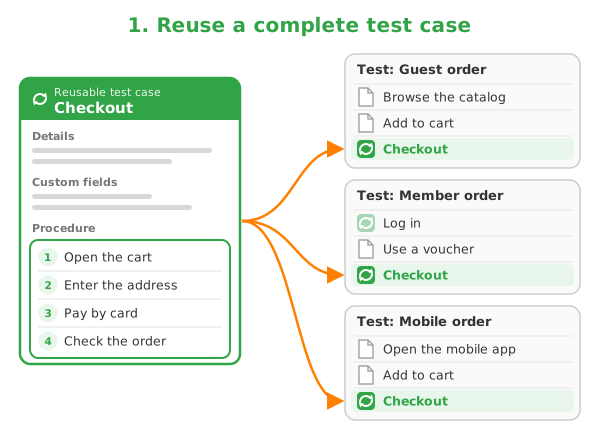
A complete reusable test case referenced by several tests
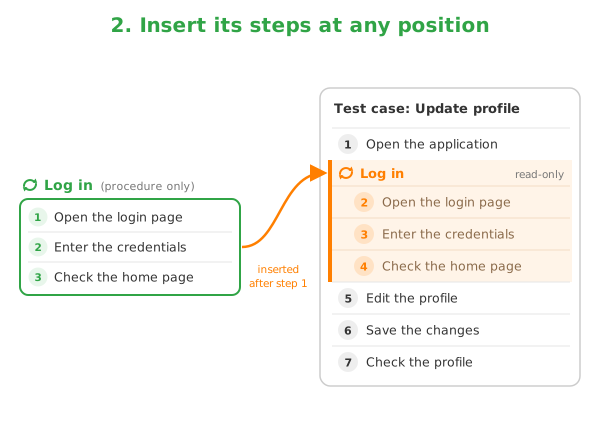
Reusable steps inserted at a precise position of a procedure
Write Once, Use Everywhere
Why, how, and who it's forWhy Reuse Test Cases
Less writing, less maintenance- Write a common sequence of steps once instead of copying it in dozens of procedures
- Update a reusable test case and every test case referencing it follows - the UI change, the new log-in page, the extra check are fixed in a single place
- Keep your test plan consistent: the same operation is always described and executed the same way
- Refactor existing tests around common sets of steps and drastically reduce the size of your test plan
How It Works
References, not copies- A reference inserted in a procedure is shown as a block: a banner with the name of the reusable test case, followed by its steps in read-only mode, numbered within the host procedure
- Copy a single referenced step and paste it to get a regular, editable step, detached from the reference
- At execution, the referenced steps are run as regular steps, in the right order, by manual testers and automated agents alike
- A deleted reusable test case is moved to the recycle bin and can be restored; if it is deleted permanently, its steps are first copied into the test cases that referenced it, so no procedure ever loses a step
Who is this for
Anyone maintaining a large test plan- Test designers writing many tests sharing the same set-up, navigation or tear-down
- QA teams maintaining large manual test plans on fast-moving applications
- Test managers who want to factorize and rationalize an existing test repository
- Both Cloud SaaS and On-Premise XQual customers
Three Ways to Reuse Test Cases and Steps
A complete test case, a block of steps, a single stepThe examples below assume a web application where most tests start by logging in, and a Checkout scenario shared by several tests.
Reusing a complete test case in a test
- Create a reusable test case named Checkout, with its description, its procedure and its custom fields.
- Select any test that must run this scenario and create a test case referencing a reusable test case, then pick Checkout in the tree of reusable test cases.
- The new test case displays the details and the procedure of Checkout in read-only mode, with a link to the reusable test case where they can be modified.
- Run it in your campaigns as usual: its results, its parameters and its campaigns belong to the test case, while its content stays shared with every other test case referencing Checkout.
The reusable test case also lists the tests referencing it, so you always know what a change will impact.
Inserting shared steps at a specific position of a procedure
- Create a reusable test case named Log in, whose procedure contains the 3 log-in steps.
- Open the procedure of any regular test case and hover the insert before or insert after button of the step where the log-in must take place.
- Choose Insert a reference to a reusable test case and select Log in: its steps appear at that exact position, as a read-only block, among the regular steps of the procedure.
- Keep editing the regular steps around it, move the block by drag and drop, or insert other references - the same reusable test case can be inserted several times in the same procedure.
When the log-in page changes, update the Log in reusable test case once: every procedure referencing it shows the new steps.
Building reusable steps and refactoring tests around common steps
- Create reusable test cases holding a single step each (e.g. Go to the home page, Empty the cart): they become reusable steps you can insert anywhere.
- Spot a test case whose procedure is repeated in other tests (the XQual Similarity Finder helps here) and convert it into a reusable test case: it is replaced by a test case referencing it, with its parameters, results and campaigns preserved.
- Replace the duplicated steps in the other procedures with references to your new reusable test cases.
References are single-level: a reusable test case procedure contains only regular steps, which keeps your building blocks simple and predictable. When you travel back in time, referenced steps are displayed as they were at the selected timetag.