

XQual Visual Traceability turns your requirements, tests and defects into a single interactive diagram, so you can see - at a glance - how everything connects and what breaks if something changes.
Hover over any link to instantly highlight every element it touches, from the System Under Test all the way to the defects it produced.
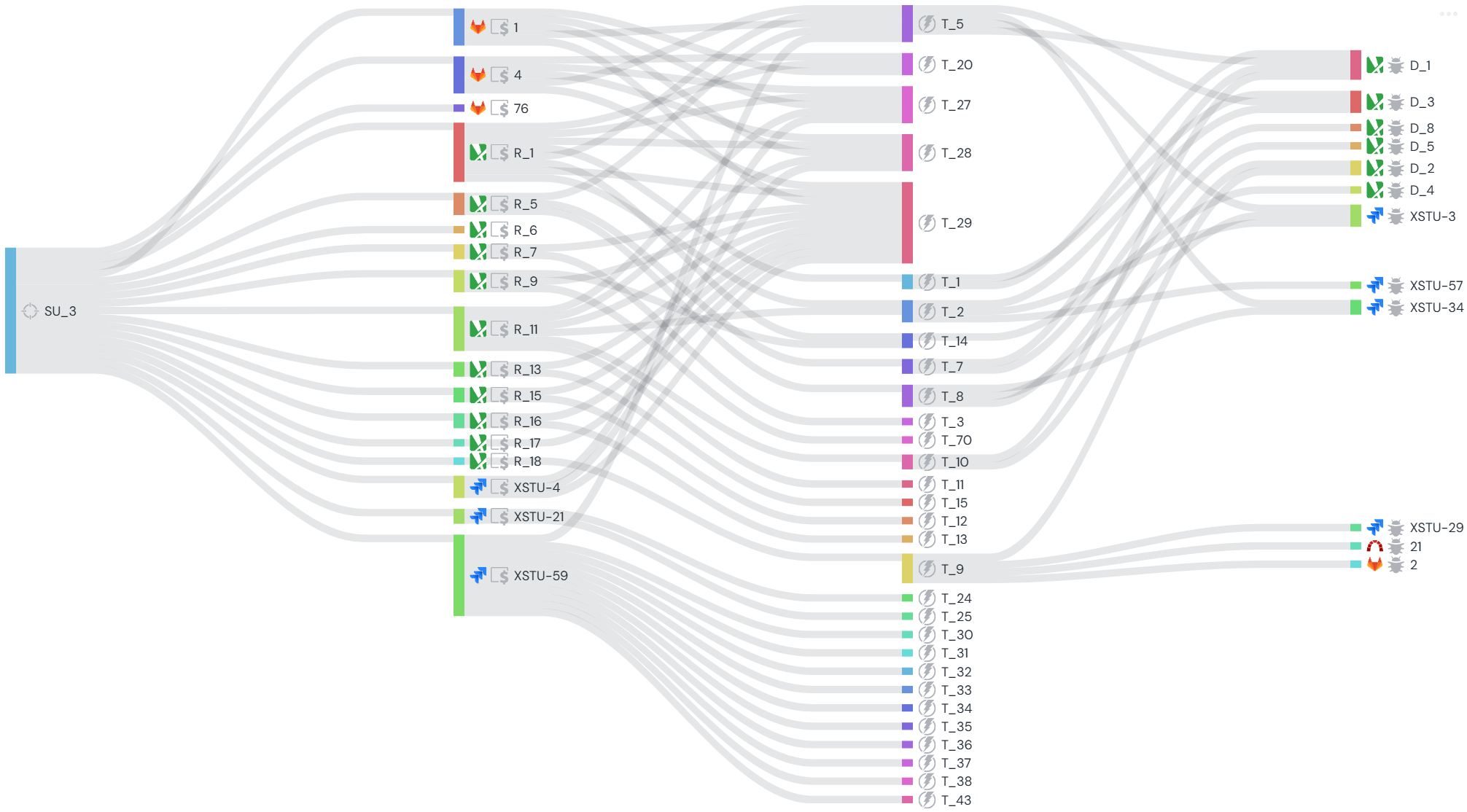
Hover over any link to instantly highlight every element it touches, from the System Under Test all the way to the defects it produced.
- One diagram, four columns: SUTs/Targets, Requirements/User-Stories, Tests and Bugs/Defects,
- Hover any link to instantly highlight the full chain of impacted elements,
- Fully contextual - launch it from any folder of requirements, or any subset of bugs, to scope the view to exactly what you need,
- Works on any project size, from a handful of items to thousands,
- Included with every XQual license - no extra cost.
No other test management / ALM solution we know of offers this kind of interactive, contextual visual traceability diagram.
Most tools only give you a static traceability matrix (rows and columns) - XQual gives you a living diagram you can explore, filter and hover through in real time.
Most tools only give you a static traceability matrix (rows and columns) - XQual gives you a living diagram you can explore, filter and hover through in real time.
Why Visual Traceability
See impact before it becomes a problem- Instantly see which tests cover a requirement, and which defects came from which test
- Spot untested or unlinked requirements at a glance, before they slip into production
- Assess the impact of a change in seconds instead of manually digging through a matrix
- Reduces the risk of regressions by making every dependency visible
- Demonstrates full requirements-to-defects traceability for audits and compliance reviews
How It Works
Interactive, contextual, always up to date- One diagram, four columns: SUTs/Targets, Requirements/User-Stories, Tests, Bugs/Defects
- Hover over any element or link to highlight the full chain it belongs to
- Color-coded by type and status for quick visual scanning
- Contextual by design - open it from a specific folder of requirements, or from a subset of bugs, to keep the view focused
- Always reflects the live state of your data - no manual matrix to maintain
- Requirements and defects can come from XQual's own built-in management or from any of your configured connectors (Jira, GitLab, Redmine, etc.) - even simultaneously, all shown in the same diagram
Who is this for
Built for traceability-critical projects- Teams in regulated industries (healthcare, finance, defense, aeronautics, public sector) needing full requirements-to-defects traceability for audits
- Release/QA managers performing impact analysis before a release
- Large projects/teams where a traditional traceability matrix becomes unreadable
- Both Cloud SaaS and On-Premise XQual customers