

XQual's Time Travel lets you freeze the whole repository at any moment with a timetag - a complete baseline of your requirements, tests and bugs - then come back to it later and browse everything exactly as it was.
Release sign-off, audit, investigation: you no longer have to wonder what the requirements or the tests looked like back then - just go and see.
Release sign-off, audit, investigation: you no longer have to wonder what the requirements or the tests looked like back then - just go and see.
- A timetag captures the current version of every requirement, specification, test, testcase, SUT, bug, attachment and link between them,
- One click captures every workspace at once - no export, no database dump, no copy of your data,
- Timetags are immutable: once set, a timetag cannot be modified,
- Travelling back is strictly read-only, enforced by the server - history cannot be rewritten by mistake,
- Available on both Cloud SaaS and On-Premise XQual.
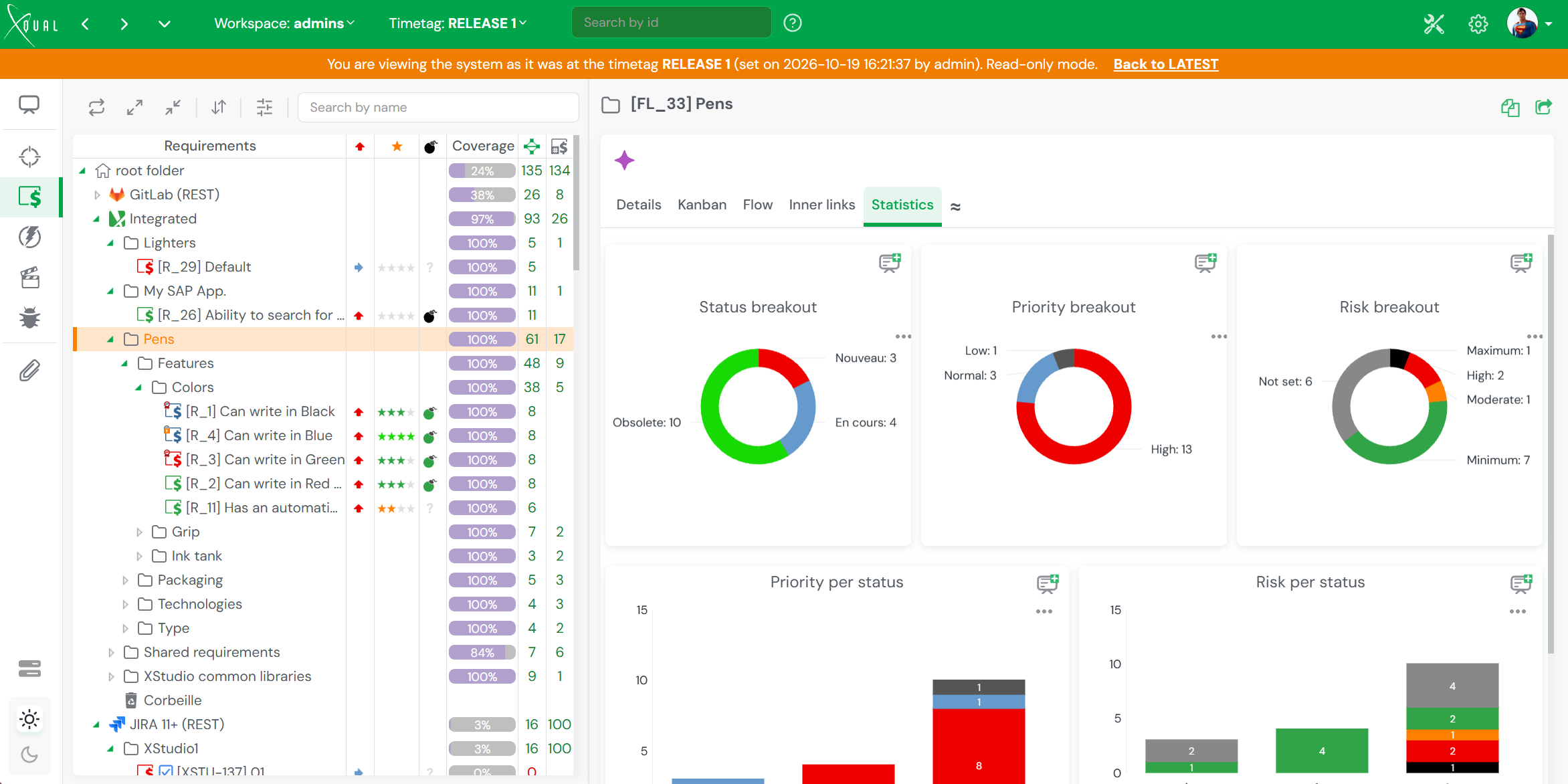
A Timetag selector sits right in the header: pick a timetag and the whole application - trees, details, traceability, reports - switches to the state of the system at that time, with an orange banner reminding you which timetag you are looking at, when it was set and by whom. Pick LATEST to come back to the present.
Travelling back to the timetag RELEASE 1: the whole repository is displayed as it was, in read-only mode
Your Repository Has a Memory
Why, how, and who it's forWhy Time Travel
Proof of what was, not a guess- Freeze a baseline at each release, milestone or sign-off, and keep it forever
- Show auditors exactly which requirements, specifications and tests existed when a version was shipped
- Investigate a regression by checking what a requirement or a testcase really said at the time
- Generate a report as it would have looked on the day of the timetag - reports reflect the time-travelled data
How It Works
Timetags, not snapshots of files- Setting a timetag associates the current version of every item and link with it, in all the workspaces
- Nothing is duplicated: XQual already keeps versions of your items, a timetag simply marks the ones that were current
- Each user travels independently - the selected timetag belongs to your session, so your colleagues keep working on LATEST
- Creating and deleting timetags are controlled by dedicated user rights
Who is this for
Anyone accountable for a release- Teams in regulated industries (medical devices, aerospace, automotive, banking...) facing audits and certifications
- QA and test managers who baseline every release and need to justify past decisions
- Product owners and project managers comparing what was agreed with what is there now
- Both Cloud SaaS and On-Premise XQual customers
Travel Back in Time in 4 Steps
From setting a timetag to coming back to the presentThe example below assumes you are about to ship a version named Release 4.2 and want to keep a reference of everything that was validated for it.
Setting a timetag and travelling back to it
- In the header, open the Timetag selector and click Set a new timetag..., then name it (e.g. Release 4.2). The current version of every item, in all the workspaces, is associated with this timetag.
- Keep working as usual: requirements, tests and bugs keep evolving on LATEST, the timetag is not affected.
- Weeks or months later, open the Timetag selector again and pick Release 4.2. An orange banner tells you that you are viewing the system as it was at that timetag, in read-only mode. Browse the trees, open any item, check the traceability, generate reports.
- When you are done, click Back to LATEST in the orange banner (or pick LATEST in the same selector) to come back to the current state of the system.
Since time travel is read-only, you can let anyone explore a past timetag without any risk for the current data.