

You define the classes and their levels, XQual takes care of the rest: valid parent/child relationships, class icons and badges in the trees, and operations applying to whole subtrees.
- Define your own classes for SUTs, requirements and specifications, each with a level, an alias, a color, an icon and a model (waterfall or agile),
- Nest items as parent/child hierarchies directly in the tree, with as many levels as you want - just create one class per level,
- The hierarchy rules are enforced by the server: an item can only be placed under an item of a lower class level, whether the change comes from the browser or from the REST API,
- Copy, move, delete, restore, freeze and sign a whole subtree in one action,
- A parent SUT aggregates the results, KPIs and bugs of all its sub-SUTs,
- Available on both Cloud SaaS and On-Premise XQual.
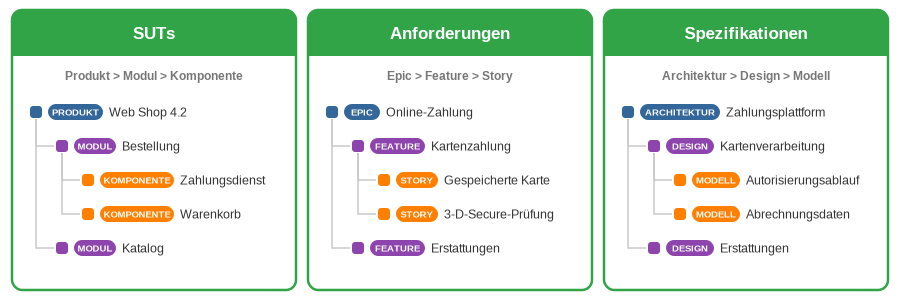
The same mechanism for SUTs, requirements and specifications: your own classes, levels, icons and badges
Requirements, SUT & Specification Hierarchies That Match Your Product
Why, how, and who it's forWhy Hierarchies
Your structure, not a workaround- Stop simulating hierarchies with folders and naming conventions: an epic really contains its features, a product really contains its modules
- See at a glance the level of each item, thanks to the class icon and the colored badge shown in every tree
- Get the real status of a product or a module: a parent SUT aggregates the results of all its sub-SUTs
- Generate tests from a requirement or a specification having children: the generated tests are organized in folders mirroring its hierarchy
How It Works
Levels, rules and subtrees- Each class has a level: an item can only be placed under an item whose class level is strictly lower - a Story under a Feature, a Feature under an Epic
- Items directly under a folder can be of any class, and a whole subtree always stays in the same folder
- Only valid choices are offered: the class drop-down, the create child menu and drag & drop all follow the rules, and the server checks them again
- Copy, move, delete, restore, freeze and sign apply to the whole subtree; signed descendants are left untouched
Who is this for
Teams with structured products and backlogs- Agile teams managing epics, features and user stories
- Teams testing products made of systems, sub-systems and components (embedded, automotive, aerospace...)
- Teams writing structured specifications, and regulated industries needing a clear decomposition for their audits
- Both Cloud SaaS and On-Premise XQual customers
Set Up Your Hierarchy in 3 Steps
From defining your classes to working with whole subtreesThe example below builds an agile requirement hierarchy (Epic > Feature > Story); the same steps apply to SUTs and specifications.
Defining your classes
- In the settings, open Custom classes and select the Requirements tab (the SUTs and Specifications tabs work the same way).
- Create the classes Epic (level 1), Feature (level 2) and Story (level 3), each with an alias, a color and an icon. Need more levels (e.g. a Task under a Story)? Just add a class of level 4, and so on.
- Reorder or disable classes whenever you need: a disabled class is no longer offered, but the items already using it keep it.
XQual protects your data: a class still in use cannot be deleted, and the level of a class cannot be changed if it would break an existing parent/child relationship.
Building the hierarchy
- Create a requirement Online payment of class Epic in any folder.
- Right-click it and choose create child requirement: the new requirement is created under it, in the same folder, and only the classes of a higher level are offered.
- Drag and drop existing requirements onto a parent to reorganize your backlog - the tree only accepts the drops that respect the levels.
Hierarchies are available on integrated requirements; requirements synchronized from a third-party tool through a connector keep the structure of that tool. Every class change is recorded in the change log of the item.
Working with whole subtrees
- Copy, move or delete an epic: its features and stories follow, keeping their classes and their relationships. Restoring it from the recycle bin restores the whole subtree.
- Freeze or sign a feature: its stories are frozen or signed with it.
- Filter any tree by class with the advanced filters, and find the class of each item in your reports.
- Generate tests from an epic (classic, AI or Gherkin generation): the generated tests are organized in folders mirroring its features and stories.
On SUTs, select a parent SUT to see its KPIs, results, bugs and traceability flow aggregated over all its sub-SUTs; a notice reminds you how many sub-SUTs are included.